







A Close Look at the Samsung Galaxy Buds 2 Pro Specs
Samsung’s Galaxy Buds 2 Pro are small enough to toss in your pocket but loaded with tech that makes them stand out in the earbud crowd. They’re built for people who want solid sound and a few smart tricks without lugging around something bulky. This article digs into the nitty-gritty of what these earbuds offer, from how they’re made to what they can do when paired with your phone.

Design and Build: How They Look and Feel
The Galaxy Buds 2 Pro don’t mess around when it comes to keeping things simple and practical. They’re designed to slip into your ears and stay there, no fuss.
Size and Weight
-
Compact Fit: Each bud weighs just 5.5 grams, light enough that you might forget they’re in. Compared to the older Galaxy Buds Pro, these are 15% smaller in volume, so they don’t feel like they’re taking over your ears.
-
Dimensions: They measure 21.6 x 19.9 x 18.7 mm per bud, making them pretty unobtrusive.
Colors and Finish
-
Options: You get three choices: Graphite, White, or Bora Purple. The buds have a glossy outside and a matte inside that’s soft against your skin.
-
Case: The charging case matches the buds’ color and keeps the same polished look, though it’s a bit chunkier at 50.1 x 50.2 x 27.7 mm and 43.4 grams.
Comfort Features
-
Ergonomic Shape: Samsung tweaked the design so they sit snugly without pressing too hard. There’s a little vent to let air flow, cutting down on that plugged-up sensation.
-
Ear Tips: They come with three sizes of silicone tips (small, medium, large) to help you find the right fit. The tips hook onto the buds easily, though you’ll want to be gentle when swapping them out.
Durability
-
Water Resistance: The buds are rated IPX7, meaning they can handle being submerged in up to 1 meter of fresh water for 30 minutes. The case, though, isn’t water-resistant, so keep it dry.
-
Real-World Use: They’re fine for rain or a sweaty workout, but Samsung says to skip the beach or pool. If they get wet, dry them off before popping them back in the case.
Sound and Audio: What You’ll Hear
These earbuds are all about delivering sound that’s clear and full, whether you’re into music, movies, or calls. Here’s how they pull it off.
Audio Hardware
-
Dual Speakers: Each bud has a 10mm woofer for bass and a 5.3mm tweeter for higher notes, covering a wide range of sound.
-
24-Bit Hi-Fi: They support 24-bit audio when paired with a compatible Samsung Galaxy device, which means more detail compared to standard 16-bit sound. It’s tied to Samsung’s Seamless Codec, so you’ll need the right phone to unlock it.
Noise Control
-
Active Noise Canceling (ANC): Three microphones with a high signal-to-noise ratio pick up outside sounds, like wind or chatter, and block them out. It’s not perfect for every noise, but it handles a lot.
-
Ambient Sound: Flip this on to hear what’s around you without taking the buds out. You can tweak the level in the Galaxy Wearable app.
-
Voice Detect: Start talking, and the buds switch off ANC, turn on ambient sound, and lower your media volume so you can chat without pulling them out.
360 Audio
-
Immersive Sound: With 360 Audio, sound shifts as you move your head, thanks to Direct Multi-channel (5.1ch/7.1ch) and Dolby Atmos support. It’s like being in the middle of a movie or song.
-
Head Tracking: The buds track your head movements for a more realistic effect, but you’ll need a Samsung device running One UI 3.1 or later.
-
Recording: Pair them with a Galaxy Z Fold4 or Flip4 (One UI 5.0+), and you can record video with 360 Audio, capturing sound directionally.
Connectivity: Staying Linked Up
The Galaxy Buds 2 Pro play nice with your devices, especially if you’re in the Samsung ecosystem. Here’s how they connect.
Bluetooth and Pairing
-
Version: They use Bluetooth 5.3, which is fast and stable. LE Audio support is planned for a future update.
-
Easy Pairing: Open the case near a Samsung Galaxy device (Android 10+ with SmartThings), and they’ll pop up for a quick tap-to-connect.
-
Auto Switch: They can jump between your Samsung phone, tablet, or watch based on what you’re doing, like answering a call while watching TV. Works with One UI 3.1+ devices.
SmartThings Find
-
Tracking: Lose a bud? The SmartThings app (Android 8+) shows their last location, with or without the case. An alarm can ping them if they’re nearby.
-
Notifications: Walk away with the buds still in the case, and your phone might nudge you so you don’t leave them behind.
Battery and Charging: How Long They Last
Battery life matters a ton when it comes to earbuds, and the Samsung Galaxy Buds 2 Pro don’t overcomplicate it. They’ve got enough juice to get you through the day, whether you’re using them casually or pushing them hard.
Playtime
How long these buds last depends on how you use them. If you’ve got active noise canceling (ANC) switched on, they’ll run for up to 5 hours straight out of the case. Pop them back in the charging case when they’re done, and you’ve got another 18 hours waiting. Turn ANC off, and they stretch further, up to 8 hours on a single charge, with the case bringing the total to 29 hours. Those numbers come straight from Samsung’s tests with everything set to default, but in the real world, it can shift a bit. Things like cranking the volume, spotty Bluetooth signals, or how often you recharge them might tweak how long they actually last for you.
Charging Options
Getting them powered up is pretty flexible. The case comes with a USB-C cable you can plug in, though you’ll need to supply your own wall adapter. When you connect it, both the buds and the case charge up together. If wires aren’t your thing, the case works with any Qi-certified wireless charger. Another option is using a compatible Samsung phone with Wireless Power Sharing, just make sure the phone’s got at least 30% battery left to share the love. To check what’s happening, keep an eye on the status lights: green means everything’s fully charged, red shows they’re still juicing up, and a flashing red light is a heads-up something’s off. If that happens, try reseating the buds in the case or reach out to Samsung if it doesn’t clear up.
Controls and Features: Running the Show
You don’t need to grab your phone every time you want to tweak something. The buds have built-in controls and app options.
Touch Controls
-
Basics: Tap once to play/pause, twice for next track or calls, three times for previous track. Hold to decline calls or trigger a custom shortcut.
-
Customization: In the Galaxy Wearable app, set hold actions for noise control, volume, or voice commands. Double-tap edge for volume is an experimental Labs feature.
Galaxy Wearable App
-
Battery Check: See how much juice the buds and case have left.
-
Equalizer: Pick from six presets to tweak the sound.
-
Fit Test: Run a quick check to ensure they’re sealed right for sound and ANC.
-
Notifications: Have texts read aloud, even while using your phone.
-
Bixby: Say “Hi Bixby” to control them hands-free (Samsung phones only).
Call Features
-
In-Ear Detection: Calls switch to the buds when worn, or to your phone when removed (toggleable).
-
Ambient During Calls: Hear your voice clearly without shouting, adjustable in the app.
Compatibility and Setup: Getting Started
These buds are happiest with Samsung gear, but they’ll work with other devices too.
Device Requirements
-
Best Fit: Samsung Galaxy phones/tablets with One UI 4.0+ for full features like 24-bit audio and 360 Audio.
-
Minimum: Android 8.0 with 1.5 GB RAM and the Galaxy Wearable app. Some tricks might not work on non-Samsung stuff.
How to Set Up
-
Pairing: Open the case or hold both touch pads for 3+ seconds to enter Bluetooth mode. Connect via the app or your phone’s settings.
-
Tips: Attach the right ear tip size, check the L/R marks, and position the wind shield up for the best fit.
-
Coupling: Lost a bud? Pair a replacement by holding both touch pads in the case for 7 seconds until the light flashes green.
What’s in the Box and Specs Rundown
Here’s the full picture of what you get and the tech details.
Included Items
-
Galaxy Buds 2 Pro (left and right)
-
Charging case
-
Three pairs of ear tips (S, M, L)
-
USB-C cable
-
Quick start guide
Technical Specs
-
Weight: Buds: 5.5g each; Case: 43.4g
-
Bluetooth: v5.3
-
Battery: Buds: 58mAh each; Case: 500mAh
-
Durability: IPX7 (buds only)
-
Sensors: Accelerometer, gyro, proximity, hall, touch, voice pickup unit
Alternative Built for Better Sleep
Ozlo Sleepbuds®
An amazingly restful and peaceful sleep every night, free from distractions and noise, is the greatest gift you can give!

What are Ozlo Sleepbuds?
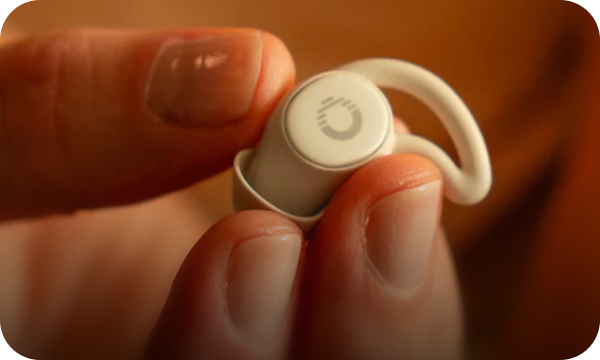
Ozlo is a science-driven, one-stop-shop for the best sleep of your life. Unlike other headphones and earbuds, our tiny Sleepbuds® are engineered to be super comfy, even for side sleepers, while blocking out sleep-disrupting sounds.
Sleepbuds® play audio for up to ten hours, letting you enjoy our noise-masking tracks or stream anything you like, including audiobooks, podcasts, white noise, and YouTube.

The Ozlo Difference
At Ozlo, we're dedicated to helping you achieve the best sleep possible through innovative audio solutions. Our company, founded by three former Bose engineers, focuses on creating products that not only help you fall asleep, but stay asleep throughout the night.
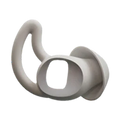
Ozlo Sleepbuds® simply don’t feel like other earbuds. Sleepbuds stay in place even when you toss and turn. The tiny earbuds, with their comfortable silicone tips and anchor-in-place wings, are designed for all-night comfort, no matter your sleeping position. Sleep on your back, side, or whatever works for you, and Ozlo Sleepbuds® will remain in place throughout the night.

Key Highlights
- Founded by three former Bose engineers with extensive experience in audio tech
- Sleepbuds® actively mask unwanted sounds like snoring, traffic, and environmental noises with calming, science-backed audio.
- Ultra-soft silicone tips designed to support every sleeping position, ensuring a secure and comfortable fit.
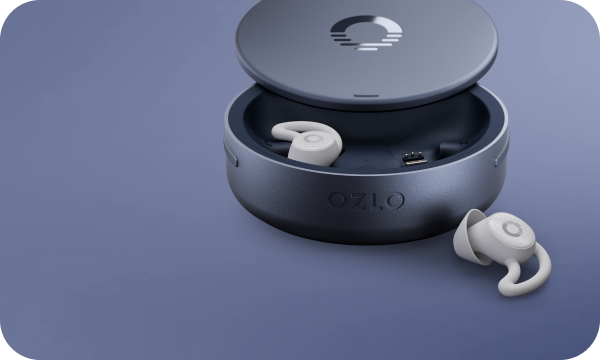
- Up to 10 hours of continuous use with extra charges from the Smart Case.
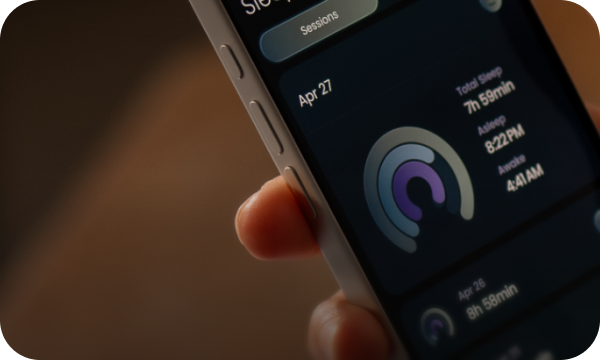
- Built-in biometric and environmental sensors offering personalized sleep reports
- Personal alarm gently wakes you without disturbing your partner
Conclusion
The Samsung Galaxy Buds 2 Pro pack a lot into a tiny package, and that’s what stands out after digging into the specs. They’re light, fit comfortably for hours, and deliver sound that’s crisp and full, especially if you’re hooked into the Samsung ecosystem with the right phone. Features like 360 Audio and noise control make them versatile for everything from movie nights to busy commutes, while the battery life keeps them going without constant recharging. They’re not trying to reinvent the wheel, just give you a solid, no-nonsense earbud experience that works with your day-to-day.
For anyone curious about alternatives, there’s also a nod to stuff like the Ozlo Sleepbuds, which focus on nighttime use with their own spin on comfort and sound. The Galaxy Buds 2 Pro, though, stick to being an all-around option, good for music, calls, or whatever else you throw at them. It’s less about picking a winner and more about what fits your routine, and these specs show they’ve got plenty to offer for people who want tech that keeps up without getting in the way.
FAQs
How long do they last on a charge?
They’ll go for up to 5 hours with noise canceling on, or 8 hours with it off. The case bumps that up to 18 or 29 hours total, depending on how you use them. Real life might tweak those numbers a bit based on volume or how often you’re connecting.
Can they get wet?
The buds are IPX7-rated, so they’re fine in up to 1 meter of fresh water for 30 minutes. Think rain or a sweaty run, not a swim. The case isn’t water-resistant, though, so keep it dry.
Do they work with non-Samsung phones?
Yep, they’ll connect to anything with Android 8.0 and 1.5 GB RAM via the Galaxy Wearable app. You might miss out on extras like 24-bit audio or 360 Audio if it’s not a Samsung device with One UI 4.0 or higher.
How do you control them?
Tap once to play or pause, twice for the next track or calls, three times for the previous one. Hold for custom stuff like volume or noise settings, which you can tweak in the app. There’s even an experimental double-tap edge option for volume.
What’s the deal with noise canceling?
Three mics handle active noise canceling, picking up outside sounds like wind or chatter to quiet them down. It’s not flawless, but it does a solid job. Ambient mode lets you hear what’s around you instead, adjustable in the app.
How do they charge?
Plug the case in with the USB-C cable, or set it on a wireless charger. You can also use a Samsung phone with Wireless Power Sharing if it’s got at least 30% battery left. Lights on the case show green for full, red for charging, or flashing red if something’s up.
Are there options focused on nighttime use?
Yeah, stuff like the Ozlo Sleepbuds exists for people who want earbuds tuned for nighttime, made to fit well for long use and play audio for up to 10 hours, with features like noise-masking tracks and a personal alarm. Different vibe from the Galaxy Buds 2 Pro, which are more of an all-day thing.


